
Artificial Intelligence (AI) is revolutionizing almost every engineering industry, and Computer-Aided Design (CAD) software is no exception. Mechanical engineers, product designers, architects, and manufacturing professionals are increasingly using AI-powered tools to improve productivity, automate repetitive tasks, optimize designs, and reduce engineering costs.
Leading CAD software such as AutoCAD and SolidWorks have already started integrating AI-powered features into their workflows. Instead of spending hours performing repetitive operations, engineers can now use AI-assisted drafting, smart block recognition, generative design, topology optimization, simulation intelligence, and automated documentation.
In this detailed guide, we will explore how AI is currently used in AutoCAD and SolidWorks, compare their AI capabilities, discuss practical engineering applications, and examine the future of AI in CAD design.
Table of Contents
What is AI in CAD Software?
Artificial Intelligence in CAD software refers to the use of machine learning, computer vision, optimization algorithms, and intelligent automation to assist engineers during the design process.
Rather than replacing engineers, AI acts as a smart assistant that can:
- Automate repetitive drafting work
- Recognize engineering features
- Optimize designs
- Detect modeling errors
- Improve manufacturability
- Generate multiple design concepts
- Predict engineering performance
- Assist with simulations
- Improve documentation
The goal is to allow engineers to focus more on innovation and less on repetitive manual work.
AI in AutoCAD
AutoCAD has traditionally been a drafting software used for creating 2D drawings and 3D models. Recent releases have introduced several AI-powered productivity features that help users complete drawings faster.
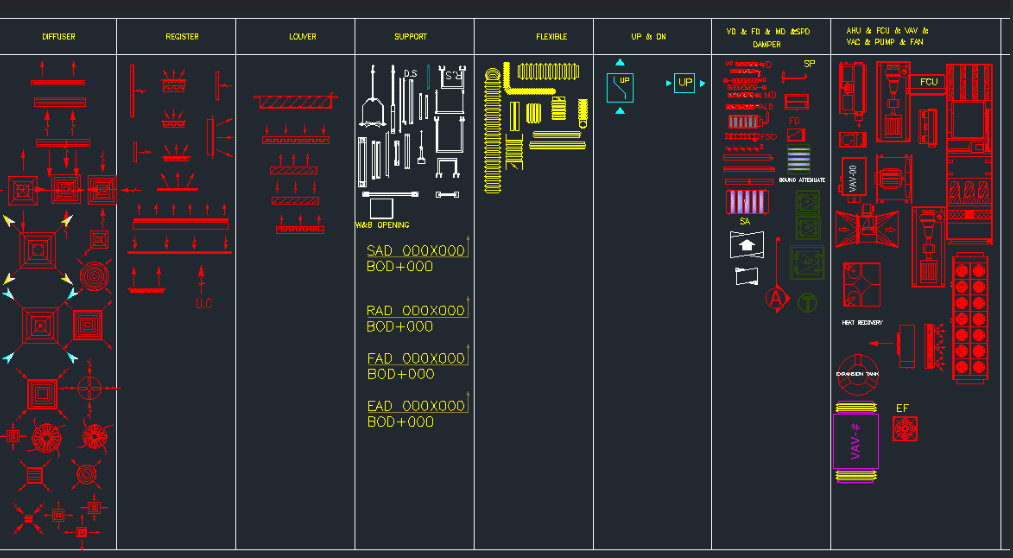
1. Smart Blocks
One of AutoCAD’s most useful AI features is Smart Blocks.
Instead of manually searching through hundreds of block libraries, AI analyzes your drawing and recommends frequently used blocks automatically.
Examples include:
- Doors
- Windows
- Electrical symbols
- Mechanical components
- Furniture
- Standard machine parts
This significantly reduces drafting time.
Benefits
- Faster drafting
- Consistent drawings
- Reduced manual searching
- Increased productivity
2. Smart Block Placement
AI can predict where blocks should be inserted by analyzing nearby geometry and previously inserted objects.
For example:
If several windows are already placed along a wall, AutoCAD can intelligently suggest the placement of another window.
3. Object Recognition from PDFs
Many engineering companies still maintain legacy paper drawings.
AI can:
- Detect lines
- Recognize circles
- Identify dimensions
- Extract text
- Convert PDF drawings into editable CAD geometry
This saves countless hours of manual redrawing.
4. Drawing Cleanup
AI assists in identifying:
- Duplicate entities
- Broken polylines
- Unconnected geometry
- Layer inconsistencies
- Overlapping objects
These tools improve drawing quality before manufacturing.
5. Intelligent Search
Instead of remembering every AutoCAD command, users can search using plain language.
Example:
“Create rectangle”
AI immediately suggests the correct command.
6. Automation with AutoLISP
AI tools can generate AutoLISP routines for repetitive drafting tasks.
Examples include:
- Automatic dimensioning
- Layer creation
- Batch plotting
- DXF export
- Title block updates
Engineers without extensive programming experience can also use AI assistants to create and modify these routines more quickly.
AI in SolidWorks
SolidWorks incorporates AI into product development, simulation, and design optimization, making it especially valuable for mechanical engineering.
1. Generative Design
Generative Design is one of the most exciting AI-assisted technologies in engineering.
Instead of drawing the entire component manually, the engineer defines:
- Loads
- Supports
- Material
- Manufacturing method
- Design space
- Weight target
The software generates multiple optimized design concepts.
Applications include:
- Aerospace brackets
- Automotive suspension parts
- Robot arms
- Industrial machine components
2. Topology Optimization
Topology optimization removes unnecessary material while maintaining structural strength.
Benefits include:
- Lower weight
- Reduced material cost
- Better performance
- Higher strength-to-weight ratio
Industries such as aerospace, automotive, robotics, and medical devices rely heavily on this approach.
3. AI-Assisted Simulation
Simulation is often time-consuming because engineers must manually modify designs and rerun analyses.
AI helps by:
- Testing multiple design variations
- Finding stress concentration areas
- Suggesting geometry improvements
- Optimizing thickness
- Reducing weight while maintaining safety
This shortens the design cycle.
4. Automatic Feature Recognition
Imported STEP or IGES models often lose design history.
AI can automatically recognize:
- Holes
- Bosses
- Fillets
- Chamfers
- Pockets
- Slots
This makes editing imported models much easier.
5. Intelligent Assembly Assistance
AI improves assembly workflows by:
- Detecting interference
- Suggesting mates
- Finding missing components
- Identifying duplicate parts
- Improving assembly performance
Large industrial assemblies become easier to manage.
6. Cost Estimation
AI evaluates:
- Material volume
- Machining complexity
- Number of features
- Manufacturing process
- Estimated production time
This helps engineers make cost-effective design decisions early.
7. Manufacturing Optimization
AI assists in:
- CNC machining
- Toolpath optimization
- Sheet metal design
- Laser cutting
- Bending sequence planning
- Material utilization
For manufacturers, this reduces production costs and improves efficiency.
AutoCAD vs SolidWorks AI Comparison
| Feature | AutoCAD | SolidWorks |
|---|---|---|
| Smart Drafting | ✔ | ✔ |
| Smart Blocks | ✔ | Limited |
| PDF Recognition | ✔ | Limited |
| AI Simulation | Limited | ✔ |
| Generative Design | Limited | ✔ |
| Topology Optimization | No | ✔ |
| Feature Recognition | Basic | Advanced |
| Assembly Intelligence | No | ✔ |
| Manufacturing Optimization | Limited | ✔ |
| Cost Estimation | Limited | ✔ |
Real-World Engineering Applications
AI-powered CAD tools are being used across multiple industries.
Automotive Industry
- Lightweight chassis optimization
- Suspension design
- Crash simulation
- Battery enclosure development
Aerospace
- Topology optimization
- Weight reduction
- Structural analysis
- Composite part design
Robotics
- Robot arm optimization
- End-effector design
- Motion studies
- Lightweight components
Sheet Metal Industry
- Automatic flat pattern generation
- Bend sequence optimization
- Nesting optimization
- DXF generation
- Laser cutting preparation
Civil and Architecture
- Building drafting
- Smart object placement
- Quantity estimation
- Construction documentation
Benefits of AI in CAD
Organizations adopting AI-assisted CAD workflows can achieve:
- Faster design cycles
- Improved drawing accuracy
- Reduced engineering effort
- Lower manufacturing costs
- Better product quality
- Reduced material waste
- Improved collaboration
- More innovative designs
Limitations of AI
AI is a powerful assistant, but it still has limitations.
Engineers are required to:
- Validate calculations
- Review AI-generated geometry
- Ensure compliance with design standards
- Apply engineering judgment
- Consider safety and manufacturability
AI complements engineering expertise rather than replacing it.
Future of AI in AutoCAD and SolidWorks
The next generation of CAD software is expected to include:
- Natural language design commands
- AI-generated 3D models from text prompts
- Automatic manufacturing drawing generation
- AI-powered tolerance optimization
- Real-time design validation
- Predictive maintenance integration
- Cloud-based collaborative AI assistants
- Voice-controlled CAD modeling
- AI-assisted sustainability analysis
These advancements will continue to reshape engineering workflows.
Frequently Asked Questions (FAQ)
Is AI replacing CAD engineers?
No. AI automates repetitive work, but engineers are still responsible for design decisions, safety, and innovation.
Does AutoCAD use AI?
Yes. AutoCAD includes AI-powered capabilities such as Smart Blocks, object recognition, drawing cleanup, and intelligent search to improve drafting productivity.
Does SolidWorks have AI?
Yes. SolidWorks incorporates AI-assisted technologies such as generative design, topology optimization, feature recognition, simulation support, and manufacturing-focused automation.
Which software has better AI features?
For advanced mechanical product development, SolidWorks currently offers more AI-assisted engineering capabilities than AutoCAD. AutoCAD’s AI strengths are primarily focused on drafting productivity and documentation.
Can AI generate complete CAD models?
AI can generate design concepts and automate parts of the modeling process, but human engineers are still needed to verify functionality, manufacturability, and compliance with engineering standards.
Conclusion
Artificial Intelligence has become an essential part of modern CAD software. AutoCAD uses AI to streamline drafting, documentation, and drawing management, while SolidWorks leverages AI for design optimization, simulation, and manufacturing assistance. As AI continues to evolve, engineers who combine traditional design expertise with AI-powered workflows will be better positioned to deliver faster, smarter, and more innovative products.
Whether you are a student, designer, manufacturing engineer, or CAD professional, understanding how AI integrates with AutoCAD and SolidWorks is an important step toward preparing for the future of engineering design.
Related posts:
 AutoCAD Basic Interface – AutoCAD Window Explained
  What are the types Of Air Conditioning | Basic Of Air Conditioning
  Air conditioning- Types, Diagram, Working, Applications
  Design and Fabrication of Automated Glass Cleaning Machine
  Windows air Conditioning | Working , Components and Application
  CAD Tut 4. Do this Initial Setting Before Starting any AutoCad Drawings.
  Autocad Vs Autocad LT- Difference Between Autocad and Autocad lt
  AutoCad Vs Solidworks- Difference between Autocad and Solidworks
Recent Posts
Velocity Ratio of Belt Drive – Formula, Explanation and Calculation
Velocity Ratio of a Belt Drive – Formula, Explanation and Calculation A belt drive is a mechanical power-transmission system used to transfer rotary motion from one shaft to another. It generally...
Aluminium Alloys: Types, Composition, Properties, Heat Treatment & Applications
Introduction Aluminium is one of the most widely used engineering materials because of its lightweight, corrosion resistance, excellent thermal conductivity, and good machinability....