
Some Dimensioning Techniques Used in Machine drawing
1. No dimension should be assumed, calculated or directly measured from drawing.
2. Dimensions should be placed outside the views, if unavoidable, they may be placed inside if more clear and easy to read.

3. No Dimensions should be repeated.
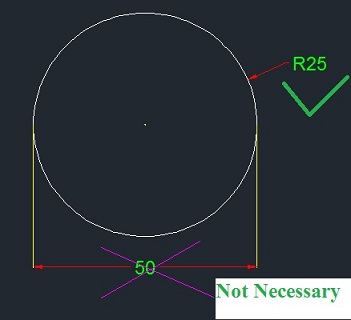
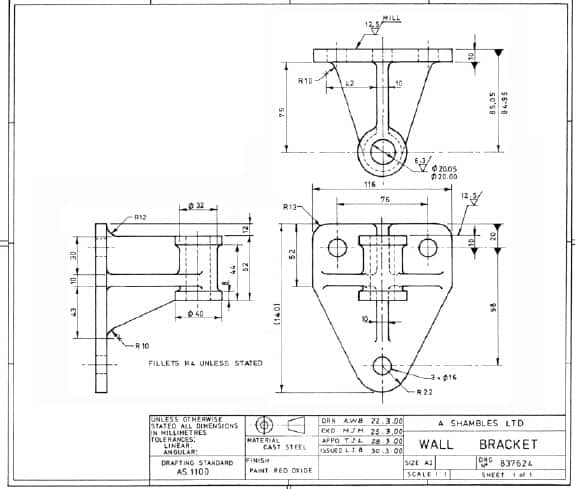
4. In orthographic views, dimensions should be given logically .Dimensions should be distributes in three views logically and equally in all views.
5. Dimensions lines should be placed at least 8 mm, away from outlines and from each other.

6. The dimensions lines should not cross each other.
7. If there are number of dimensions, the smaller one should be nearer to the view, as shown in fig.

8. For a numbers of dimensions, they should be given in a progressive manner i.e. in increasing order as given in fig.
9. When a number parallel dimension lines are to be drawn, they are shown staggered as shown in fig.

10. Arrowheads should ordinarily be drawn within the limits of dimensioned features. But when the space is too narrow, they may be placed outside as shown in fig.

11. Dimensions of cylindrical parts should as far as possible in the views in which they are seen as rectangles .The dimensions indicating a diameter should be followed by a symbol as shown in below fig.

12. When there are of small holes, their diameters should be given by a notes as shown in figure

13. Angular dimensions may be shown by one of the method shown.

14. Countersunk and threading are shown as below.

15. Symbols for methods of projection must be shown on drawings.

Related posts:
 Engineering Drawing | Scale | Tips For Dimensioning
  Engineering Drawing Basic | Interview Question and Answers – Part 2
  What is Engineering Drawing | Basic of Machine drawing
  Engineering Drawing Online Notes , Objective and Interview Questions
  List Of Engineering Drawing Tools | Drawing Instrument
  Engineering Drawing Basic | Sheet layout , title Block , Notes
  Production Drawing | Need , Elements Of Production Drawing
  Tube Drawing – Types ,Tube Sinking ,Tube Drawing with Mandrel
One thought on “Some Dimensioning Techniques Used in Machine drawing”
Leave a Reply
Recent Posts
Velocity Ratio of Belt Drive – Formula, Explanation and Calculation
Velocity Ratio of a Belt Drive – Formula, Explanation and Calculation A belt drive is a mechanical power-transmission system used to transfer rotary motion from one shaft to another. It generally...
AI in AutoCAD and SolidWorks: Complete Guide for Mechanical Engineers (2026)
Artificial Intelligence (AI) is revolutionizing almost every engineering industry, and Computer-Aided Design (CAD) software is no exception. Mechanical engineers, product designers, architects, and...
Great techniques. I also think you should try this write my paper service.